OOMMF Tutorial Part 5: OOMMF Tips
An assortment of OOMMF tips that will hopefully make your OOMMF life easier.
Simulation cell size
One of the easiest ways to speed up your simulation is to increase the cell size. Unfortunately this is also one of the easiest ways to get spurious results. Check out this explanation of discretization, exchange length and getting your cell size right.
Periodic Mesh
I’ve mentioned this before, but it is handy to know, so I’ve included it here. Using a periodic mesh can be useful for shortening computation times and get around end-effect issues such as stray fields.
Variable substitution
Variable subsitution allows you to set variables at the start of your mif file and have the script use or modify them later on. It’s such a basic thing, and I know it’s in the user manual, but I remember it taking a little while for me to figure out at first. You can enable variable substitution in a specify block using ‘subst’ and a pair of additional brackets, as in this example
# Divide image file into mesh, periodic in x direction
Specify Oxs_PeriodicRectangularMesh:mesh [ subst {
cellsize {$xcell $ycell $zcell}
atlas :atlas
periodic x
} ]
without these extra terms OOMMF won’t know what to do with $var1 $var2 etc in the Specify block.
Syntax-highlighting
Do yourself a favour and use a sensible text editor like notepad-2mod which can do syntax highlighting on the OOMMF mif files. Trying to find that rogue brace or missing space is made much more difficult than it needs to be when you’re just using vanilla notepad.
Parallel Processing
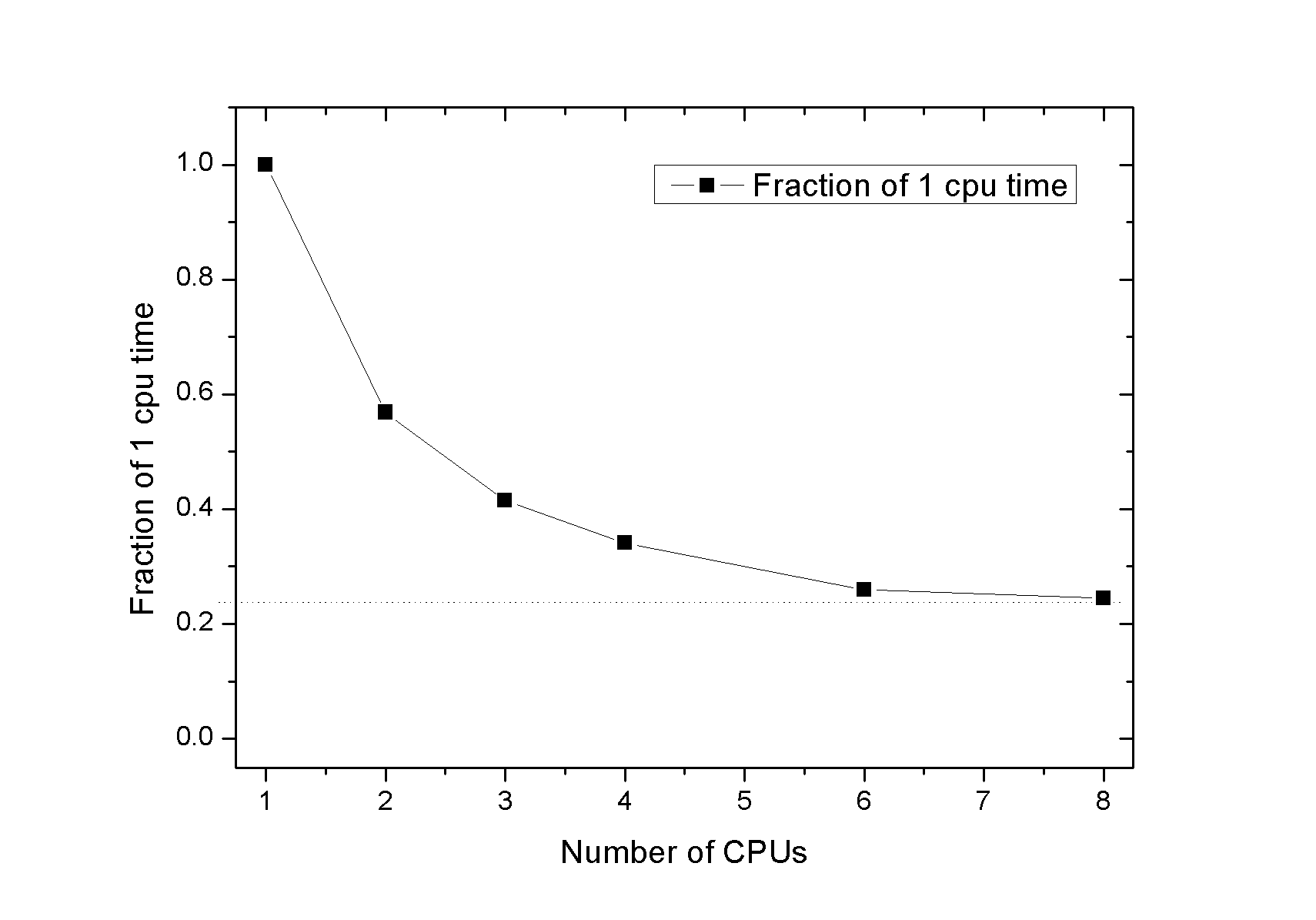
Another way of speeding up OOMMF, which won’t damage the physics. Current versions of OOMMF come with parallelisation enabled (You’ll have to make sure you’ve installed the correct versions of Tcl/Tk for it to activate). Parallel processing can give a dramatic improvement in performance [pdf]. In my own tests I’ve seen as much as a 5x improvemetn in simulation times for 8 cores:
 |
|---|
| You can get dramatic performance increases by enabling parallelization in OOMMF. |