How to Merge Polygons in Python
I’ve been working with the Shapely python package in python. This is a short guide for how to merge polygons in python. This guide is based on “cascaded_union.py” in the shapely examples. Find out how to install shapely in python here.
How to Merge Polygons in Python
Download the script for this guide here. In a most simple sense we can just do something like this to merge polygons: [code language=”python”] from shapely.geometry import Polygon from shapely.ops import cascaded_union polygon1 = Polygon([(0, 0), (5, 3), (5, 0)]) polygon2 = Polygon([(0, 0), (3, 10), (3, 0)]) polygons = [polygon1, polygon2] u = cascaded_union(polygons) [/code] This will produce a merged polygon “u”. Let’s build on this to plot the original polygons, merge them, and then plot the merged polygon, too. First, plot the original polygons:
1
2
3
4
5
6
7
8
9
10
11
12
13
14
# plot these two polygons separately
fig = plt.figure(1, figsize=SIZE, dpi=90)
ax = fig.add_subplot(111)
poly1patch = PolygonPatch(polygon1, fc=BLUE, ec=BLUE, alpha=0.5, zorder=2)
poly2patch = PolygonPatch(polygon2, ec=BLUE, alpha=0.5, zorder=2)
ax.add_patch(poly1patch)
ax.add_patch(poly2patch)
xrange = [-2, 12]
yrange = [-2, 8]
ax.set_xlim(*xrange)
ax.set_xticks(range(*xrange) + [xrange[-1]])
ax.set_ylim(*yrange)
ax.set_yticks(range(*yrange) + [yrange[-1]])
ax.set_aspect(1)
Which gives us this output:
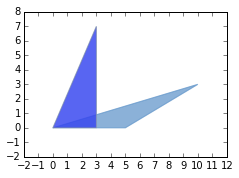 |
|---|
| Two polygons to merge |
Now merge the two polygons and plot them:
1
2
3
4
5
6
7
8
9
10
11
12
13
14
15
# Make the merged polygons
u = cascaded_union(polygons)
# Make new figure for the merged polygon
fig2 = plt.figure(2, figsize=SIZE, dpi=90)
ax2 = fig2.add_subplot(111)
patch2b = PolygonPatch(u, fc=BLUE, ec=BLUE, alpha=1, zorder=2)
ax2.add_patch(patch2b)
xrange = [-2, 12]
yrange = [-2, 8]
ax2.set_xlim(*xrange)
ax2.set_xticks(range(*xrange) + [xrange[-1]])
ax2.set_ylim(*yrange)
ax2.set_yticks(range(*yrange) + [yrange[-1]])
ax2.set_aspect(1)
fig2.show(2)
Which gives us the output:
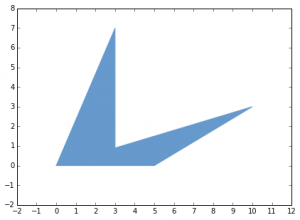 |
|---|
| Merged polygons |
Get the python file for this guide here.